

Anycubic 3D Printer S1 Combo Multicolor With Ace 2 Pro Filament Box with Drying Capability
Anycubic 3D Printer S1 Combo Multicolor With Ace 2 Pro Filament Box with Drying Capability
Regular price
€629,00 EUR
Regular price
€633,00 EUR
Sale price
€629,00 EUR
Unit price
per
Tax included.
0 in Stock. Available online!
Couldn't load pickup availability
- Printer Technology: FDM
- Auto Bed Leveling: Yes
- Build Volume: 250 × 250 × 250 mm
- Layer Resolution: 0.05-0.3
- Carbon Fiber Supported: Yes
- Max Heated Bed Temperature: 120°C
- Print Speed: Up to 600 mm/h
- Max Nozzle Temperature: 320 °C
- Enclosed: Yes
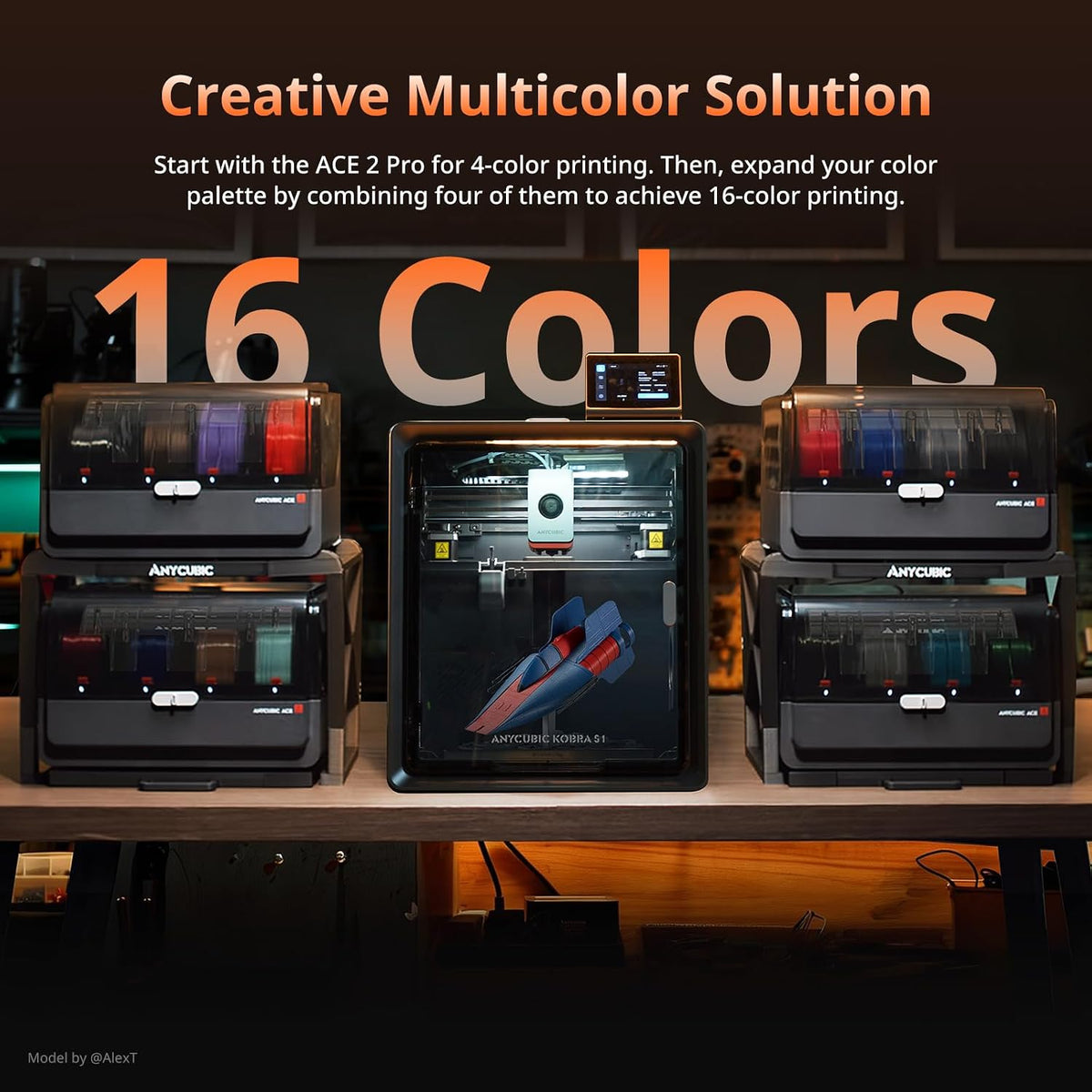
- Out-of-the-Box Multicolor: The Anycubic Kobra S1 ACE 2 Pro combo makes multicolor 3d printing effortless. The standard ACE 2 Pro provides 4-color printing out of the box and expands to 16 vibrant colors with 4 ACE 2 Pro for unique models.
- Quiet 44dB Mode: Work or sleep without interruption. Powered by 4 independent brushless motors and a next-gen buffer mechanism, the Kobra S1 ACE 2 Pro quiet 3d printer limits operational noise to 44dB, making it an ideal choice for family and homes.
- High-Speed CoreXY Enclosure: The 250x250x250mm build volume is surrounded by a fully enclosed CoreXY structure. Driven by Kobra OS, the Kobra S1 ACE 2 Pro maintains extreme accuracy at a rapid 600mm/s print speed, satisfying detailed printing needs.
- 65℃ Dehumidifier & Storage: Protect prints from humidity defects. The integrated Kobra S1 ACE 2 Pro dry box delivers efficient 65°C active drying while printing. It perfectly preserves filament quality for PLA, PETG, ABS, ASA, and other filaments.
- Clog-Free 320°C Smart Tech: Equipped with a clog-resistant 320°C hotend and a wear-resistant ceramic feeding port, the Kobra S1 ACE 2 Pro includes intelligent identification, auto-resume printing, and comprehensive smart sensors to prevent failed prints easily
- Note: ACE Pro and ACE 2 Pro cannot be uesd simultaneously. The filaments inside the box in the picture are for display purpose only and not included. Test filament sample is provided in the package.
The Standalone Workflow STEPS (Without a Computer Attached)
Features & Specs
- Print Technology: FDM (Fused Deposition Modeling) CoreXY
- Build Volume: 250 × 250 × 250 mm
- Print Speed: Up to 600 mm/s (Recommended: 300 mm/s)
- Extruder: Dual-Gear Direct Drive Extruder
- Filament Compatibility: PLA, PETG, ABS, ASA, TPU, PA, PC, PET, PVB, and fiber-reinforced filaments
- Nozzle Temperature: Up to 320°C
- Heated Bed Temperature: Up to 120°C
- Leveling: LeviQ 3.0 Auto-Leveling with Auto Z-Offset
- Printing Accuracy: ±0.1 mm
- Layer Height: 0.05 – 0.36 mm
- Nozzle Diameter: 0.4 mm standard (Expandable to 0.25 mm, 0.6 mm, 0.8 mm)
- Display: 4.3-inch Capacitive Touchscreen
- Connectivity: Wi-Fi, USB
Anycubic ACE 2 Pro Filament Box
- Spool Capacity: 4 Spools (expandable up to 16 colors with four ACE 2 Pro units)
- Active Drying Temperature: Up to 65 °C (Active PTC heating while printing)
- Moisture Control: Active electromagnetic exhaust valve & passive airtight silicone sealing ring
- Motors: 4 independent brushless motors (≥5,000-hour rated service life)
- Filament Swap Speed: ~56 seconds per color change (50 mm/s feed rate)
- Filament Feeding Port: Wear-resistant alumina ceramic inlet with external PTFE tube buffer
- Sensors & Detection: Real-time temperature & humidity monitoring, filament RFID identification, runout detection, and tangle detection
- Filament Compatibility: 1.75 mm PLA, PETG, ABS, ASA, PET, PA, PC, PVB, TPU (68D), and fiber-reinforced filaments (CF/GF)
- Spool Size Compatibility: Flange diameter: 195–200 mm | Spool width: 60–68 mm | Flange thickness: 3–6 mm
- Noise Level: Under 48 dB (closed-door printing) / 55 dB (with drying active)
- Power Rating: Max 330W (220V) / 235W (110V)
- Printer Compatibility: Kobra 3, Kobra 3 V2, Kobra 3 Max, Kobra 3 Max V2, Kobra S1, Kobra S1 Max, Kobra X
Dimensions & Weight (Individual Units)
Kobra S1 3D Printer Body
- Length (Depth): 40.0 cm
- Width: 41.0 cm
- Height: 49.0 cm
- Weight: 18.0 kg
ACE 2 Pro Filament Box
- Length (Depth): 36.8 cm
- Width: 29.15 cm
- Height: 23.65 cm
- Weight: 3.7 kg
Combined Setup (Side-by-Side)
- Length (Depth): 40.0 cm
- Width: 70.15 cm
- Height: 49.0 cm
- Weight: 21.7 kg
Shipping Box / Package for 3D Printer (Shipped in 1 Box)
- Length (Depth): 49.0 cm
- Width: 48.4 cm
- Height: 59.3 cm
- Weight: 25.0 kg
Shipping Box / Package for ACE 2 Pro Filament Box
- Length (Depth): 44.5 cm
- Width: 34.5 cm
- Height: 32.0 cm
- Weight: 4.8 kg